

The existing app presented several usability and design challenges. Users encountered a cluttered interface, inconsistent navigation, and a lack of intuitive access to key features. These issues hindered effective communication and user engagement.
CHALLENGE
Timeline
4 Months
Team
1- UX/UI Designer
1- Engineer
2- Medical Researcher
1- Manager
Software Used
Figma
Miro
Microsoft Office
Adobe Creative Suite
SOLUTION
The redesign created a clean, intuitive, and cohesive interface. Simplified navigation, consistent typography and colors, and prioritized key actions make it easy for users to access lessons, track progress, and view rewards. Gamification and progress indicators enhance engagement, resulting in a more efficient, accessible, and user-friendly app.

Existing Canopy App
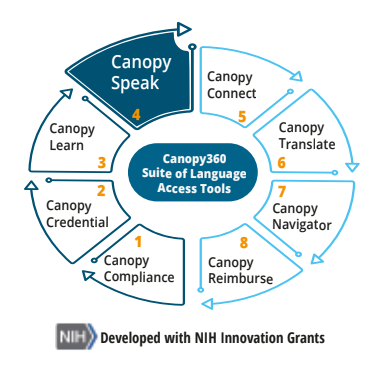
CanopySpeak is a comprehensive communication tool that takes a 2-in-1 approach to assist patients and clinicians communicate with basic questions and answers.


Feedback on the App
01
The app has a confusing structure; users may struggle to find lessons, track progress, or access rewards.
02
The app has a confusing structure; users may struggle to find lessons, track progress, or access rewards.
03
Low contrast colors and small fonts may make it difficult for users with visual challenges to interact with the app comfortably.
04
Layout & Spacing: Some screens feel overcrowded, and important elements are not visually prioritized, making it hard for users to scan information quickly.

The Research
To redesign Canopy Speak in a way that truly supports healthcare professionals, I started by stepping into their world. I spoke with 10 healthcare providers who use the app daily, diving into their workflows, frustrations, and what they wish the app could do better. These conversations revealed patterns in how they interact with the app and where it slows them down.
Next, I ran a card-sorting exercise to see how users mentally group features and prioritize tasks. This hands-on activity uncovered which functionalities were essential versus nice-to-have, giving me a clear map of user priorities.
Bringing together these insights, I identified key pain points, feature gaps, and opportunities for improvement. These findings became the foundation for the redesign, guiding decisions to make the app more intuitive, efficient, and motivating for the people who rely on it every day.
I often spend more time navigating the app than focusing on learning new phases.
Medical Professional


My Journey: Motivation Through Progress
Staying consistent in language learning often depends on feeling a sense of growth and connection. The My Journey page was designed to highlight those small but meaningful wins while making learning more social and motivating.
Visible Rewards: Progress feels tangible through unlockable features and achievement milestones.
Light Competition: Leaderboards encourage consistency without pressure.
Collaborative Pods: Learners track group progress and start conversations with peers.
Connected Learning: Rewards, milestones, and community make practice engaging and social.

Home Page
Research revealed that users often struggled to find the right content quickly, which made the learning process feel fragmented. To address this, the new home page introduces a clean, structured layout that supports effortless navigation and discovery.
Key features include:
Shortcuts to Playlists, Pain, and My Journey for quick access to the most-used sections.
A fun, swipe-based practice tool that allows learners to review vocabulary and full phrases in an engaging way.
Specialty-based playlists, enabling users to select content relevant to their specific field or patient needs.
A streamlined navigation bar, guiding users smoothly to their next destination within the app.

AI Private Tutor: Personalize Guidance
The AI Private Tutor guides learners through the app, answers questions, and provides feedback, creating a personalized, supportive learning experience for medical language practice.
Guided Navigation: Directs users to the right content and features based on their current learning needs.
Progress Feedback: Tracks performance and suggests next steps to maximize learning outcomes.
Contextual Support: Answers questions both inside and outside the app for real-world medical scenarios.
Heuristic Improvements: Ensures usability through clear feedback, error prevention, and intuitive flows, reducing cognitive load and frustration.
Project Retrospective
Business Impact
The redesigned Canopy app shifted from being a learning tool to a strategic asset for healthcare providers. By simplifying navigation, clarifying content, and personalizing resources, it supports faster language acquisition and stronger patient communication—improving trust, accuracy, and professional growth. Early feedback points to higher engagement and stronger retention.
Ongoing Challenges
Ongoing Challenges
Scaling personalization across specialties and ensuring adoption in time-pressed workflows remain key hurdles. To stay competitive, Canopy must evolve its AI-driven learning, content strategy, and enterprise integrations while balancing compliance demands.
What's Next
Next steps focus on adaptive learning paths, specialty-based playlists, and collaborative features that build accountability. On the enterprise side, opportunities exist to partner with hospitals, training programs, and health systems to embed Canopy directly into existing workflows. This positions the app not just as a tool for learning, but as a business-critical platform for improving care delivery and provider training.
Key Learnings
-
Business Alignment: Design gains impact when tied to efficiency, adoption, and patient satisfaction.
-
Scalability: Personalization must grow seamlessly across users and specialties.
-
Workflow Fit: Adoption depends on integration into daily routines.
-
Design as Differentiator: Clear, motivating UX drives enterprise adoption in a crowded market.