Design Process
User Research
User Interview
Competitive Analysis
Discover
Define
User Personas
User Journey Map
Ideate
User Flow
Card Sorting
Site Map
Design
Wireframe
Hi-Fi Designs
Prototype
Testing
Feedbacks
Conclusion
Future Concepts
Timeline
1st Week
2nd Week
3rd Week
4th Week
5th Week
6th Week
Discover
Define
Define
Ideate
Design
Testing

Remote Workplace Wellness
Problem Statement
How might we inspire meaningful connections and expand social support to ensure employee wellness in the remote workplace.
Solution
By fostering a culture that prioritizes social well-being alongside performance, we aim to alleviate stress, reduce isolation, and promote mental health. This holistic approach cultivates a supportive remote work environment where employees feel connected, appreciated, and empowered—ultimately driving both well-being and productivity.
Role
UI/ UX Designer
Reseacher
Skills
Figma, Wireframing, Adobe Suite, User Interview, Research, Prototyping
Journey Map
This helped us gain deep insights into the problem and identify ways to enhance the overall experience.

FEELINGS AND THOUGHTS
PHASES
1. Guidelines
2. Establish team notes
3. Create timeline for each segment
4. Brainstorming with using whiteboard
5. Research background & gathering information
6. Determine most efficient methods
7. Do the work individually
8. Team discusses & combines work
9. QA - Review and Refine
10. Creating Final draft
11. Present to stakeholders / leadership
12. Action feedback & apply revisions
13. Submit and release to the world
ACTIONS
OPPORTUNITIES
PAIN POINTS
Facing disagreements regarding the allocation of tasks.
Facing disagreements regarding the allocation of tasks.
Some team members work from different timezones.
Experiencing burnout and prolonged stress.
Time consuming or unproductive meetings.
Physical pain from long hour and too much screen time.
Communicates with team interests in particular task.
Conducting efficient meetings that suit all remote coworkers.
Flexible work schedule, works whenever most productive.
Hosting unstructured virtual coffee breaks or office hours.
Priorities time for mental and physical breaks throughout the day.
Documenting key learnings for future project references.
User Research
We conducted user research that provided valuable insights into employee experiences, challenges, and opportunities for improving remote work environments.

Feeling Isolated working Remotely
Work from home lifestyle is leading to feeling of loneliness and isolation as the opportunities of social interaction and making connections with coworkers have reduced.

Irregular daily routine, and low efficient mode
Some of the interview, they have flexible work time, and most of them like to work at night instead of daytime. Because of that, they are concern about their health.

Miscommunication with colleague
Most of the participants have a hard time communicating with their colleague, especially when it is a limited time and time zone different to discuss a project. The only solution is to schedule the virtual meeting together to reduce the miscommunication.
Productivity improvements and work arounds

Workers feel they are better able to focus without distractions in the office. Some older workers wish more tech support was available to them remotely, but have found work arounds with virtual IT chats.
Flexibility at a social cost

Remote workers love being able to work while they travel or live in more affordable places without a commute. They crave more social interactions in the course of the day

Missing out on in-person opportunities
Some people felt they were missing out on learning and opportunities for advancement, by not being seen as often by managers and not being able to nurture work friendships or find mentors easily.

Site Map & User Flow

Meet Alex!
32 Years old, Fully remote, with a home office setup optimized for productivity.
User Scenario
Despite enjoying the flexibility, John misses the spontaneous social interactions he had with his colleagues in the office. He wishes there was a platform where he could discover and participate in events aligned with his interests and connect with coworkers outside of work-related tasks.


Work Hive
An app that helps you choose from a variety of events to connect remotely with colleagues who share common hobbies and fun projects, fostering collaboration and team bonding.
Registration & Authorization
Authorization can be streamlined using Gmail, Apple ID, or Facebook, allowing users to log in quickly and securely with their preferred account.

Search for an Event
This app makes it easy to find company events by category, saving you time on a busy workday. Quickly see all relevant events happening in your company based on your selected preferences.


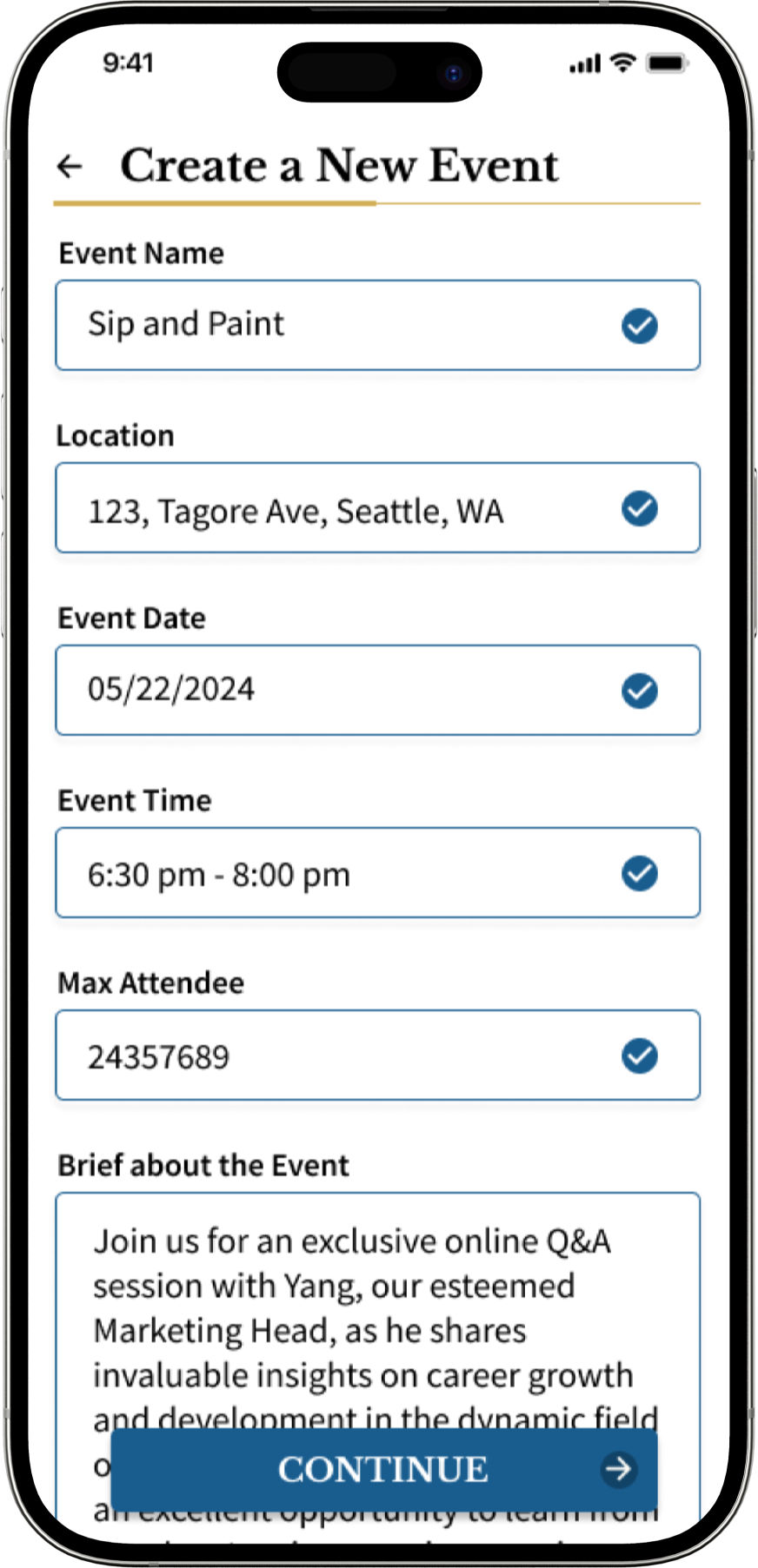
Create a New Event
Create a new event effortlessly when inspiration strikes or you want to host a fun gathering. With just a few easy steps, you can set up an event and invite your colleagues to join in.
User Profile
Manage your profile effortlessly, where you can make updates, see your friends, view your followers, and track the events you've attended.

Low Fidelity Wireframe
These are initial sketches and basic representations of Work Hive app interface.

Select your Interest
-
Choose what they are interested in to customize your next pages
-
New in the company- can assign you work buddy
Detail of Event Page
-
Option to post a question before the event
-
Shows the price of the event or if it’s free of charge
-
Detail about the event, venue and time


Message Chat
-
Can chat with group of people who volunteer for the event
-
Chat with individuals about common interest
Events as per category
-
Can filter events according to requirements
-
Can sync office calendar and check for meeting & work schedule
-
Option to create a new event and let others join

02
Select the category which best fits the event description.
Wohoo!! New Event is successfully created and visible to everyone now.
03

Let's brainstorm a fantastic event! Create a new event by adding exciting detail and specifics about the event.
01

User Feedback
User 1
"Interesting app, I like the adding to office calendar that makes easy to set meetings. Also I feel more categories can be added."
User 2
"UI looks great, also can we make the buttons end to end? I like the idea of interacting with employees other an just office work."
"Great app! Messaging privately and in a group would be fun way to interact with everyone. Doing yoga with my colleagues, love that idea."
User 3
Next Steps

01
Ensure the app is inclusive by meeting accessibility standards (e.g., WCAG).
02
Add subtle animations for interactions like button clicks or page transitions to enhance the experience.
03
Review and improve the loading time, transitions, and responsiveness.
04
Introduce challenges, streaks, or rewards to encourage usage and engagement.
Make Connections
Connect with peers through group chats or private messages, enhancing your event experience and make new connections.


Usability Testing
Conducted usability testing to assess user ease and efficiency in interacting with the product, identifying key areas for improvement.

User wanted to share the ticket details with their colleagues after purchasing it.
The user was unsure what action to take if they decided not to add the event to their calendar.

User wanted to know how to edit profile
User wanted to know more about the user and there interest selected
